If your inbox seems more crowded every day, you’re not alone. Spam emails have become increasingly sophisticated, making it harder to tell the difference between legitimate messages and scams. While clicking the “Unsubscribe” link may seem like the quickest solution, it’s not always the safest choice.
Many legitimate companies honor unsubscribe requests, but cybercriminals often include fake unsubscribe links to trick recipients into clicking. These links can confirm that your email address is active, direct you to fraudulent websites, or even attempt to install malicious software. Before taking any action, ask yourself one simple question: Do I recognize and trust the sender?
Cybersecurity experts recommend using safer methods to reduce unwanted email while protecting your personal information. The good news is that Gmail and most other email providers include built-in tools that can help you manage unwanted messages without putting your privacy at risk.
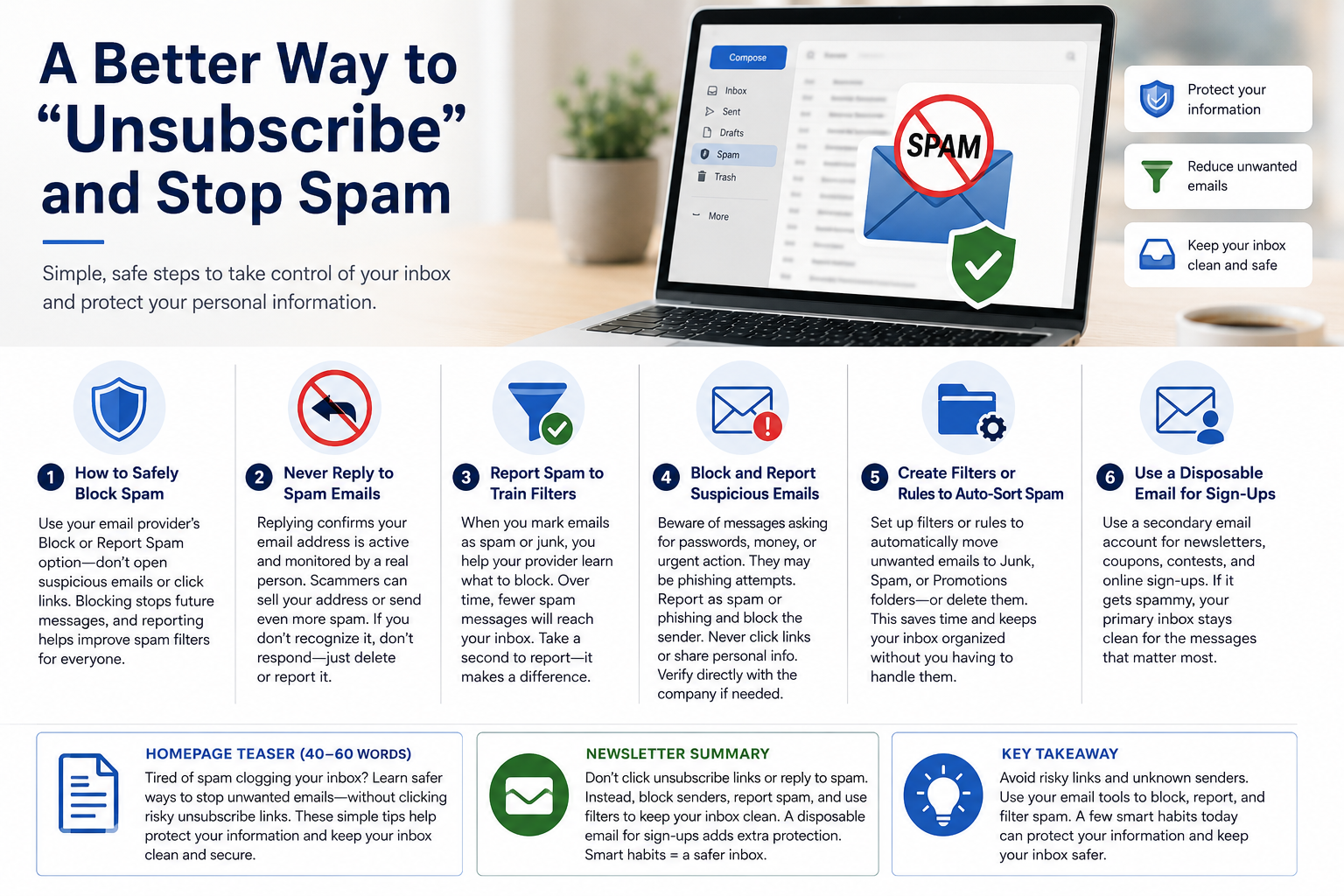
How to Safely Block Spam
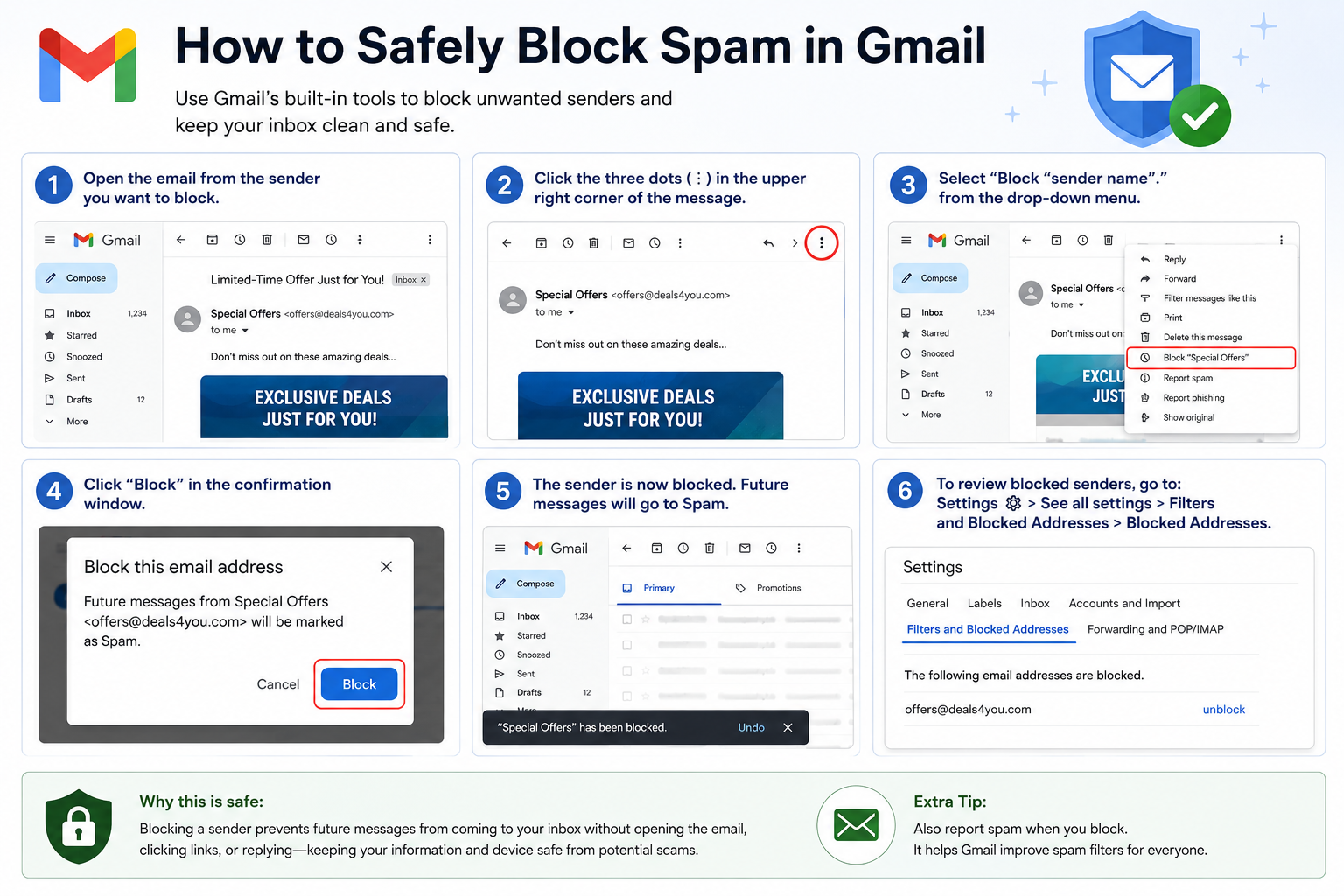
Most email providers, including Gmail, Outlook, Yahoo, and Apple Mail, include built-in tools to block unwanted senders. Instead of opening suspicious emails or clicking links inside them, use the Block or Report Spam option provided by your email service.
Blocking prevents future messages from reaching your inbox, while reporting spam helps improve your email provider’s ability to identify similar messages for everyone.
Never Reply to Spam Emails
Even if a message says, “Reply with REMOVE to stop receiving emails,” don’t do it.
Responding confirms that your email address is active and monitored by a real person. That information can be valuable to scammers, who may sell your address to other marketers or send even more unwanted messages.
If you don’t recognize the sender or weren’t expecting the email, the safest response is no response at all.
Report Spam to Train Filters
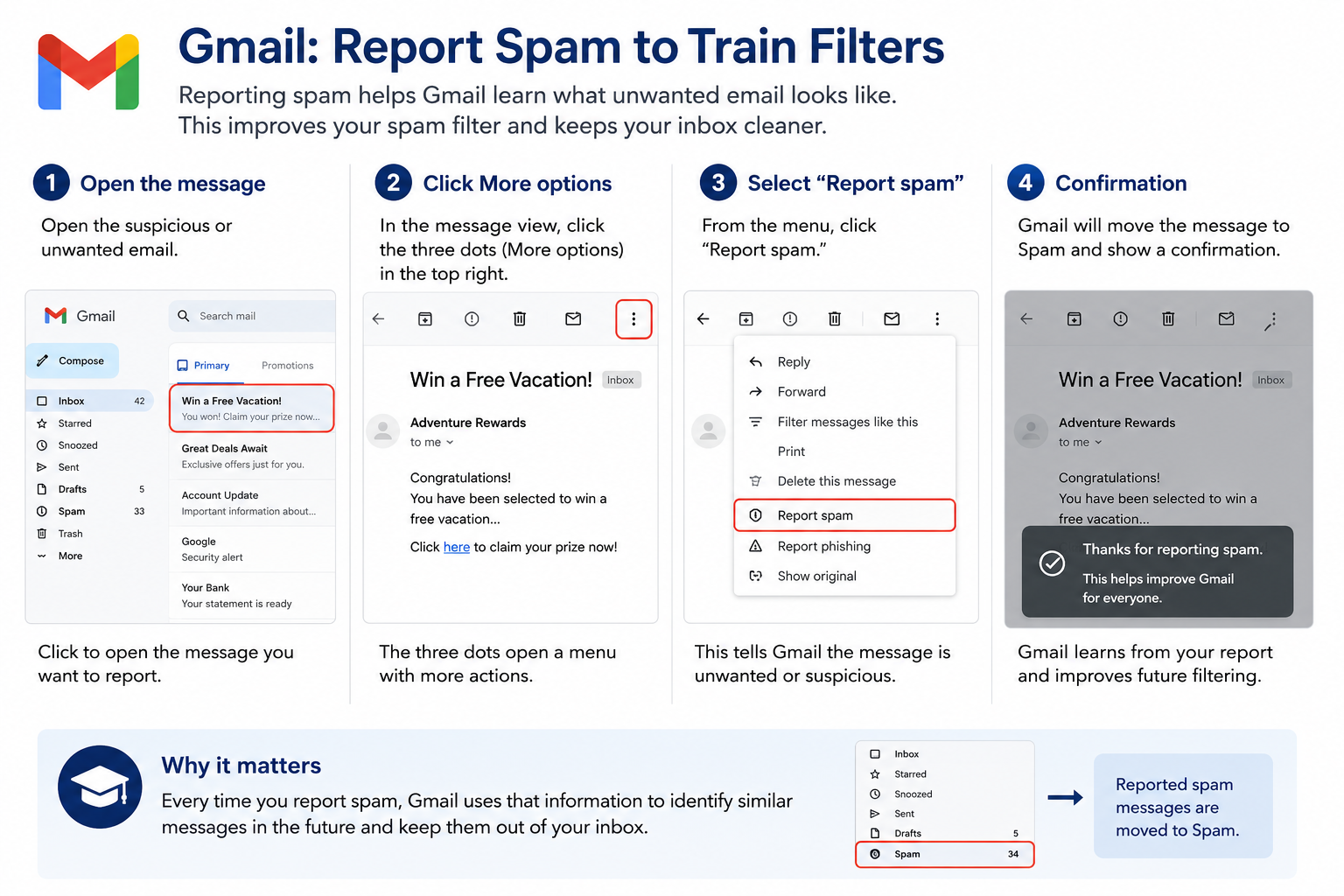
Every time you mark an unwanted email as spam, you’re helping your email provider improve its filtering system.
Spam filters use millions of reports from users to recognize patterns in fraudulent messages. Over time, fewer of these emails will reach your inbox.
Instead of simply deleting suspicious messages, take an extra second to click Report Spam or Junk. It’s one of the easiest ways to improve your inbox security.
Block and Report Suspicious Emails
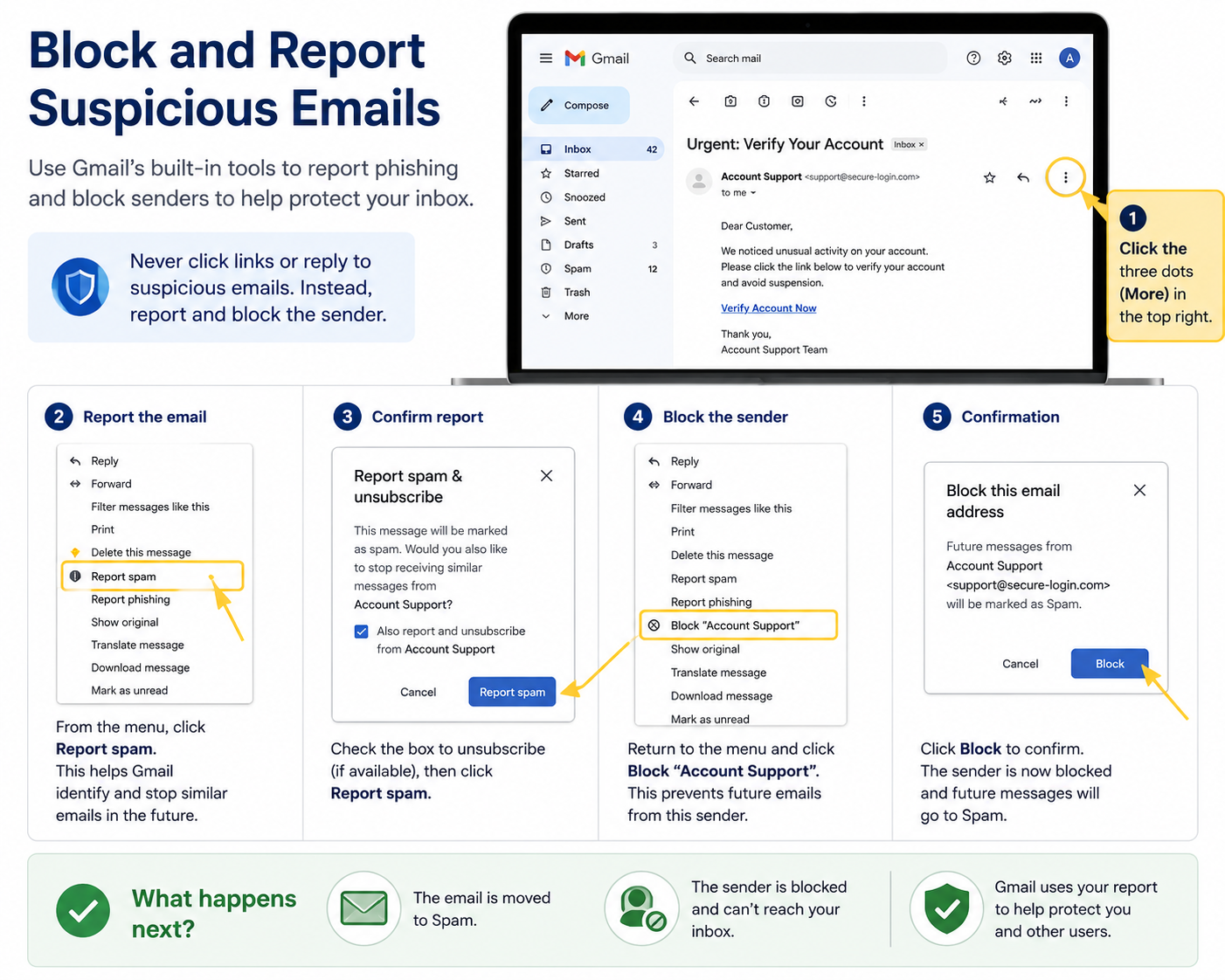
Some emails are more than annoying—they’re dangerous.
Messages asking you to verify passwords, claim prizes, pay invoices you don’t recognize, or click urgent links may be phishing attempts designed to steal personal information.
If you receive one, report it as spam or phishing and block the sender immediately. Never click links, download attachments, or provide personal information unless you’re absolutely certain the message is legitimate.
When in doubt, contact the company directly using a phone number or website you already know—not the contact information provided in the email.
Create Filters or Rules to Auto-Sort Spam
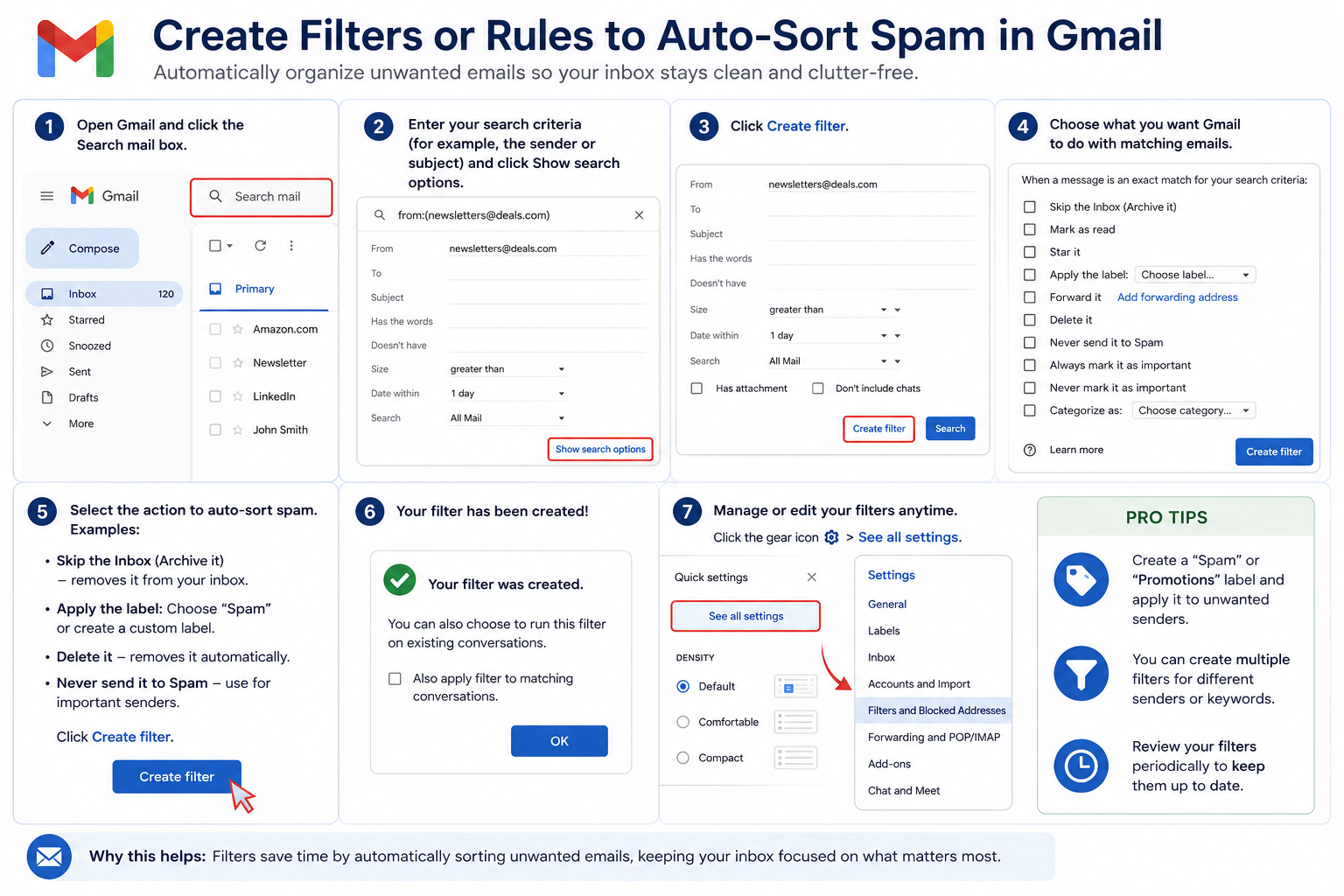
Most email services allow you to create filters or rules that automatically move unwanted messages into a separate folder or delete them before they reach your inbox.
For example, if you repeatedly receive promotional emails from a particular sender, you can create a rule that automatically sends future messages to your Junk or Promotions folder.
These filters save time and keep your inbox organized without requiring you to handle the same unwanted messages repeatedly. Spending just a few minutes creating filters today can save hours of sorting through unwanted email over the course of a year.
Use a Disposable Email for Sign-Ups
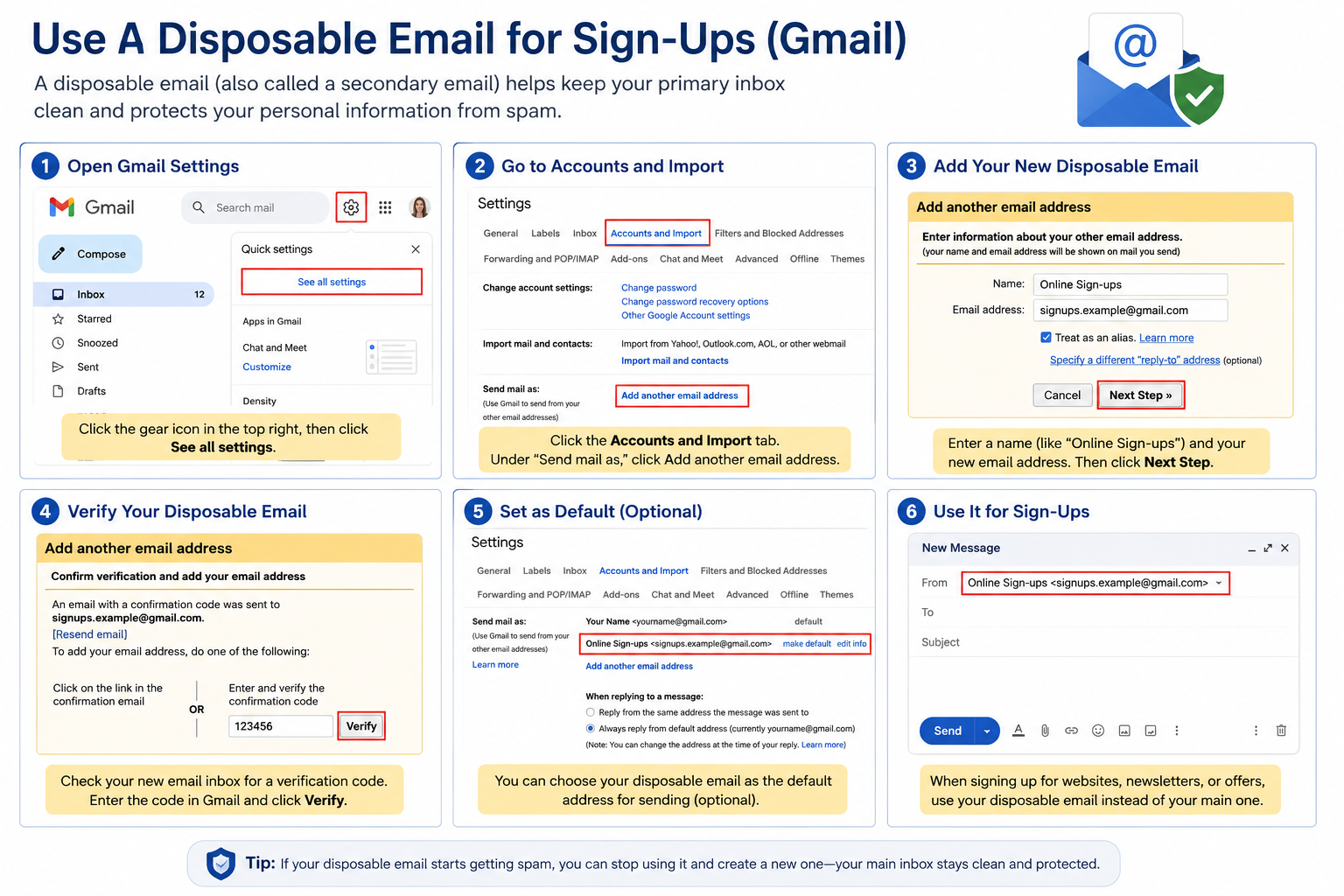
Many websites ask for an email address before allowing you to download coupons, enter contests, or receive special offers.
Instead of giving out your primary email address, consider creating a secondary email account used only for newsletters, online shopping, travel bookings, and registrations. If that address begins attracting spam, it won’t clutter your personal inbox.
A separate email account also makes it easier to identify which companies may have shared or sold your email address. If the secondary account becomes overloaded with unwanted messages, you can simply stop using it and create another one without affecting your primary communications.
Keeping your primary email reserved for family, friends, healthcare providers, banks, insurance companies, and trusted organizations makes it much easier to spot important messages and recognize suspicious emails that don’t belong.
A Safer Inbox Starts with Smart Habits
There is no way to eliminate spam completely, but you can dramatically reduce it by avoiding risky unsubscribe links, blocking suspicious senders, reporting spam, and using your email provider’s built-in security features.
Think of these habits as regular maintenance for your inbox. Just as you lock your front door and shred sensitive documents, managing unwanted email is another important step in protecting your personal information. The small amount of time you invest today can help prevent identity theft, phishing attacks, and unnecessary frustration in the future.
With the instructional images in this guide, you’ll see exactly where to click in Gmail to block, report, filter, and organize unwanted messages. By following these simple steps, you’ll spend less time sorting through junk mail and more time reading the messages that truly matter.
A few smart habits today can help keep your inbox cleaner, protect your personal information, and reduce your chances of becoming the target of an email scam.
A Message from the IT Team
Technology continues to change, and so do the scams that target older adults. That’s why the NCRO IT Team is committed to providing practical, easy-to-understand information that helps our Members use technology with confidence.
Our goal is simple: to share tips, tools, and step-by-step guidance that help keep you safe online, protect your personal information, and make technology work for you—not against you.
Whether you’re learning a new app, protecting your smartphone, or recognizing the latest email scam, we hope each newsletter gives you knowledge you can put to use right away.
Thank you for reading and for being part of the NCRO community. We look forward to bringing you more technology tips that help you stay connected, informed, and secure.
Stay safe online
Dale Koch
Chair, NCRO IT Team
...with Edits and Modifications
More from the IT Team | Keeping you safe online
If your inbox seems more crowded every day, you’re not alone. Spam emails have become increasingly sophisticated, making it harder to tell the difference between …